
Software for distributors
Buy from the principal, take orders from retailers, deliver on challans and bill on GST invoices, with stock by location and outstanding by retailer. Tradeloom runs both sides of a distribution business from one system, and exports to Tally for your CA.
Buying from the principal
Purchase orders and goods receipts
Raise a purchase order on the principal, receive the goods against it on a goods receipt, and record the purchase bill. Stock goes up when the goods are received.
What is still to come
The pending orders report lists every purchase order line not yet received, with the quantity ordered, received and pending, so short supplies are not forgotten. Goods sent back go on a debit note.
Selling to retailers: order, challan, invoice
Retailer orders come in through the day, goods go out on the van, and the bill follows. Each step is made from the one before it, so nothing is typed twice.
-
Order to challan
Deliver all of an order or part of it
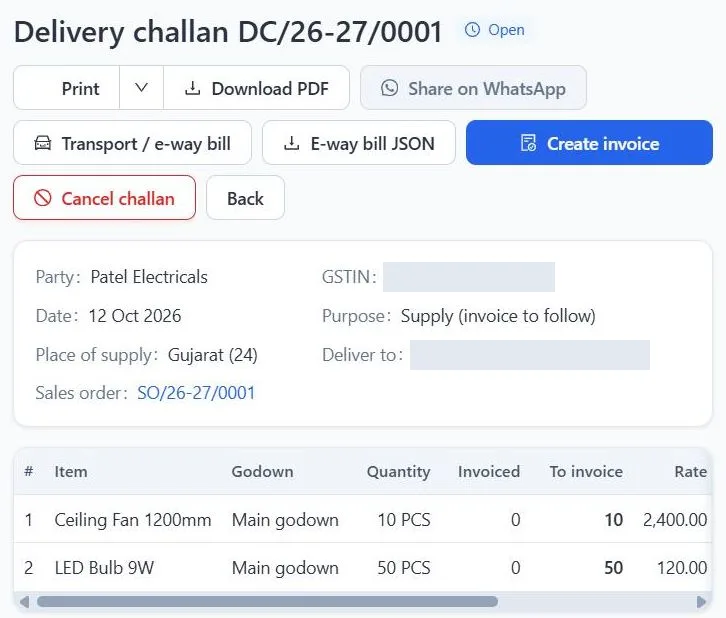
Record each retailer's order as a sales order, with their own order number if they send one. Send what is in stock on a delivery challan, with transport details and the e-way bill number; stock leaves the godown when the challan is saved. The order and the pending orders report show what is still to deliver, item by item.
-
Invoice to payment
Bill, collect and see the whole business
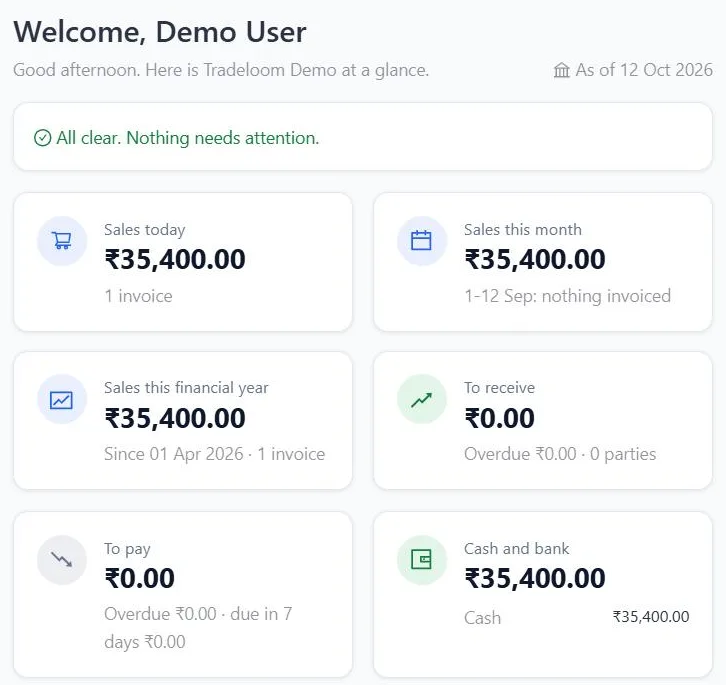
Bill one challan or several on a single GST invoice and record receipts against invoices. The dashboard shows sales for the day, the month and the year, what retailers owe you, what you owe the principal, and cash and bank.
Stock, rates, credit and people
Stock by location Growth
Keep stock by godown and move goods between them with stock transfers. Growth includes 3 locations; Starter covers 1 location. Items can be sold in alternate units, such as a case or a single piece.
Rates by customer type Growth
Keep separate price lists for retailers, wholesalers and institutional buyers, give one customer their own list, and set the date a new rate starts.
Outstanding by retailer
Set a credit limit and credit days for each retailer. Outstanding shows who owes what and against which invoice, and party statements are ready to send.
Each person sees only their screens
Give the billing clerk, the godown keeper and the accountant their own sign-in with only the screens they need, and see who changed what. Starter includes 3 users, Growth 10 users.
Your CA gets a Tally XML export of sales, purchases, receipts, payments and journals, with ledgers and stock masters, to import into TallyPrime. The Tally export is on every plan.
Built in Ahmedabad
Tradeloom is made and supported in Ahmedabad, for distributors serving retailers across the city and the rest of Gujarat. Support is by phone, WhatsApp and email, in English, Hindi and Gujarati.
Questions from distributors
Can I track what the principal has still to supply?
Yes. Receive goods against each purchase order on a goods receipt. The pending orders report lists every purchase order line not yet received, with the quantity ordered, received and pending.
Can I deliver part of a retailer's order?
Yes. Send what is in stock on a delivery challan and the rest later. The sales order shows, item by item, what has gone on challans, what has been invoiced and what is still pending, and you can bill several challans on one GST invoice.
Can I keep stock at more than one location?
Yes, on the Growth plan: stock by godown and stock transfers between godowns, with 3 locations included. Starter covers 1 location, and more locations are quoted separately.
Can each staff member see only their own screens?
Yes. Each person gets their own sign-in with only the screens they need, and every change is recorded with who made it. Starter includes 3 users and Growth 10 users; extra users are quoted separately.