
Billing and stock software for Ahmedabad traders

Tradeloom runs quotations, sales orders, challans, GST invoices, purchases, stock and payments for trading businesses in Ahmedabad, in the browser. It is built and supported here in Ahmedabad, in English, Hindi and Gujarati.

Licence from ₹9,999. Hosting and support from ₹833 a month, billed yearly. Plus GST if applicable.

One-time licence. Your data in your own database. Free 30-day pilot with your own items.

Excel, Tally and WhatsApp: three places for one order

Most trading businesses in Ahmedabad run on the same three tools, and the same order gets typed into each of them.

Orders arrive on WhatsApp.

A dealer sends a list, someone copies it into an order book or a sheet, and then again into the bill. Every retyping is a chance to get a rate or a quantity wrong.

Stock lives in Excel.

Goods leave the godown on a challan, but the sheet is updated at night, if at all. By the afternoon nobody is sure what is really on the shelf.

Tally sees it last.

Tally is where your CA keeps the books, so entries reach it late. Until then, outstanding is a guess and payments are chased from memory.

From quotation to payment, typed once

Each document is made from the one before it, so the party, items, rates and GST carry forward instead of being typed again. These are real screens from the live demo, with its sample data.

  1. Step 1

    Quotation

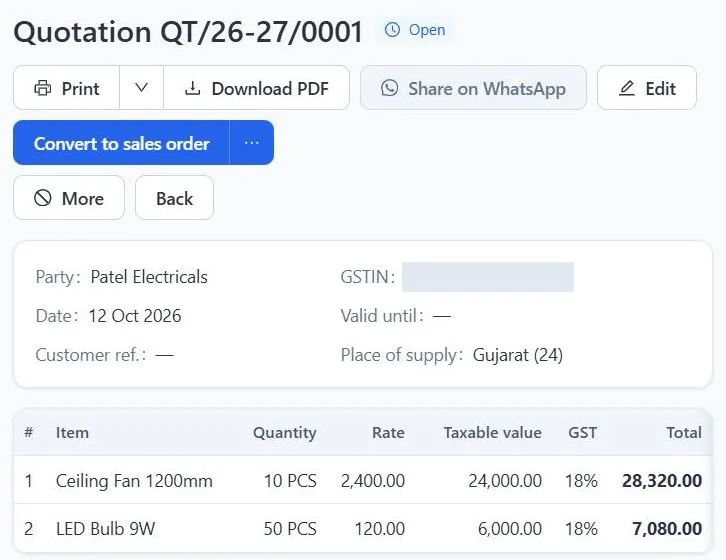
    Pick the party and the items. GST is worked out from each item's GST rate and the place of supply: CGST and SGST within Gujarat, IGST for another state. Send it as a PDF with your name and logo.

    Tradeloom quotation QT/26-27/0001 in the demo for the sample party Patel Electricals: ceiling fans and LED bulbs with quantity, rate, taxable value and 18% GST, and a Convert to sales order button.
  2. Step 2

    Sales order

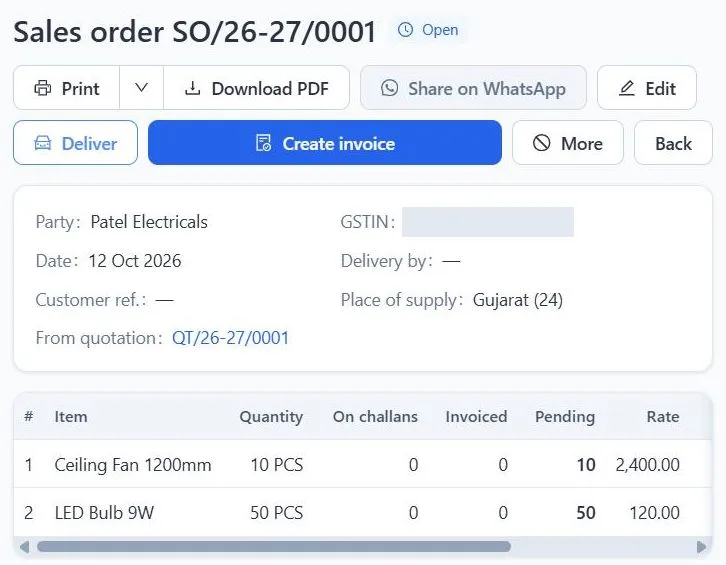
    When the customer confirms, turn the quotation into a sales order without retyping it. Pending orders show what is still to be delivered, item by item.

    Sales order SO/26-27/0001 made from quotation QT/26-27/0001, showing for each item the quantity ordered, on challans, invoiced and still pending, with Deliver and Create invoice buttons.
  3. Step 3

    Delivery challan

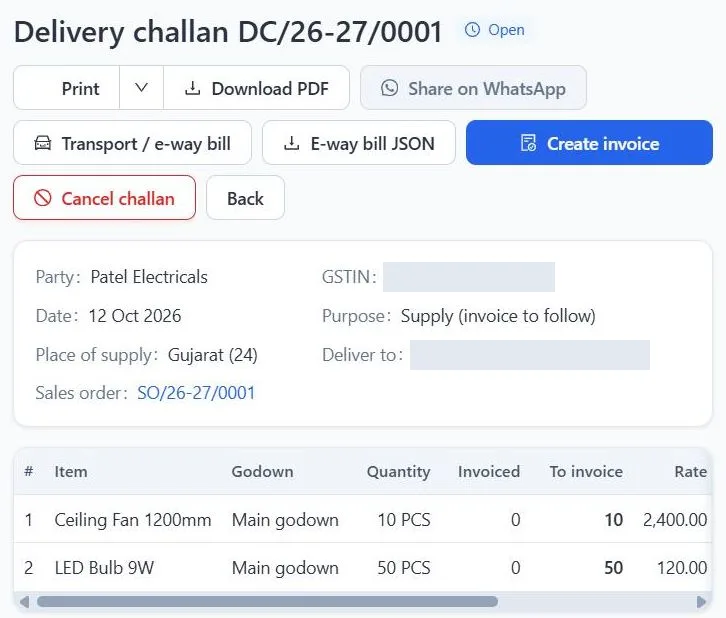
    Send the goods against the order on a delivery challan, with transport details and the e-way bill number. Stock leaves the godown when the challan is saved, so the stock report is right the moment the tempo leaves.

    Delivery challan DC/26-27/0001 against sales order SO/26-27/0001: 10 ceiling fans and 50 LED bulbs sent from Main godown, with Transport / e-way bill and E-way bill JSON buttons.
  4. Step 4

    GST invoice

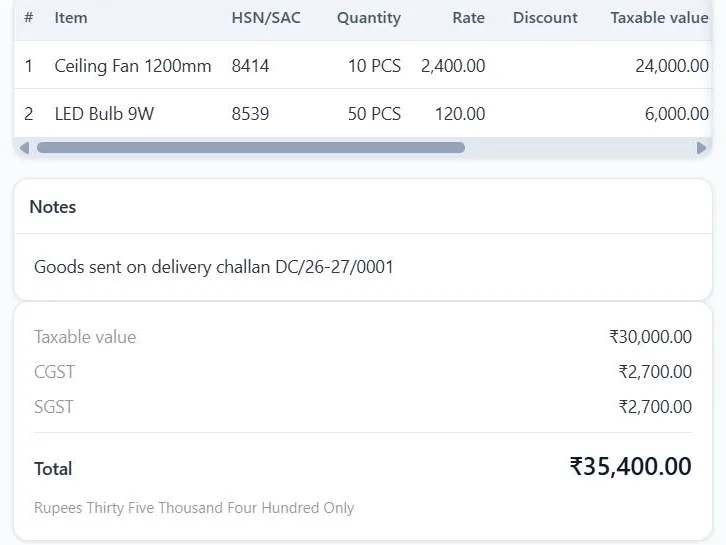
    Bill one challan or several on a single GST invoice. Each line carries the item's HSN code, the tax is split into CGST and SGST (or IGST), and the invoice flows straight into the GST reports.

    GST invoice lines with HSN codes 8414 and 8539, a note that the goods went on delivery challan DC/26-27/0001, and the tax split: taxable value ₹30,000, CGST ₹2,700, SGST ₹2,700, total ₹35,400.
  5. Step 5

    Payment

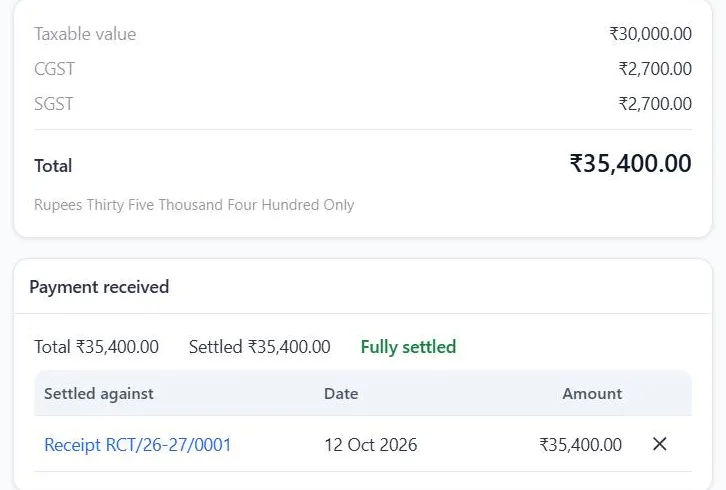
    Record the receipt against the invoice. A settled invoice leaves the outstanding list; whatever is still due shows by party, with a statement you can send.

    The same invoice after payment: ₹35,400 settled by receipt RCT/26-27/0001 and marked Fully settled.
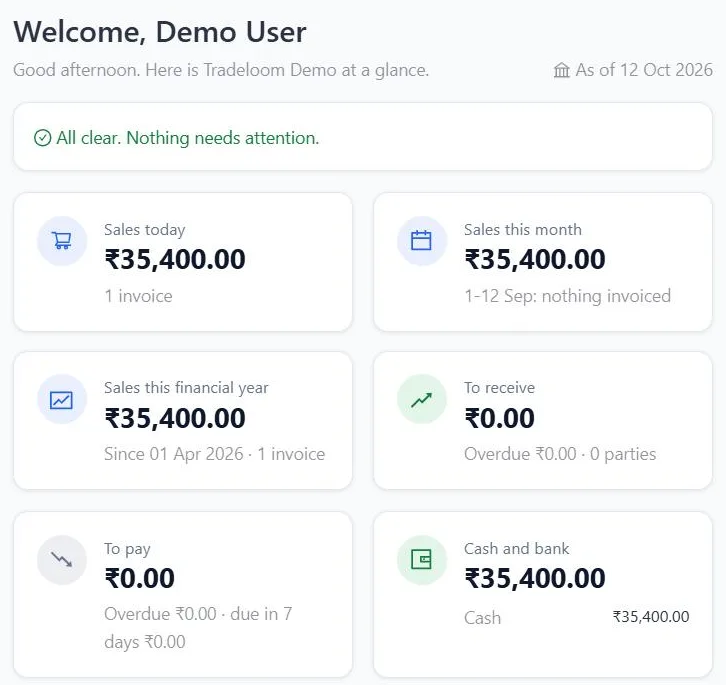
Tradeloom dashboard in the demo: sales today, this month and this financial year, amounts to receive and to pay with overdue totals, and cash and bank balances.
The dashboard brings the day together in one screen.

Units, credit and godowns the way you trade

Sell in the unit the customer asks for

Each item has a main unit and alternate units with a factor: a coil of 90 m sold by the coil or by the metre, a box of 10 sold by the box or by the piece. Each unit has its own decimal places, so 12.5 m is fine and 12.5 pieces is not. Every item carries its HSN code and GST rate.

Credit limit and credit days per party

Set a credit limit and credit days for each customer. Outstanding shows who owes what and against which invoice, and party statements are ready to send.

Stock per godown Growth

Keep stock by godown and move goods between godowns with stock transfers. Starter covers one location.

Price lists Growth

Keep separate rates for dealers, contractors and walk-in customers, give one customer their own list, and set the date a new rate starts.

Keep Tally for your CA

Tradeloom does not replace Tally. Export sales, purchases, receipts, payments and journals, with ledgers and stock masters, as Tally XML your CA imports into TallyPrime. Re-importing a period updates entries instead of duplicating them. The Tally export is on every plan, and reports also export to Excel.

Built for Ahmedabad's markets

Tradeloom is made in Ahmedabad for the way trade runs here: dealer orders and deliveries from the old-city markets, and regular supply to the factories in the industrial estates. These are the markets Tradeloom is built for.

Old-city wholesale markets

Kalupur, the Relief Road electrical market, Gheekanta and Revdi Bazaar. Many items in many units, regular dealers on credit, and goods sent out on challans across the city before the bill is made.

Naroda, Vatva and Odhav GIDC

Supply to registered businesses in the industrial estates: purchase orders and goods receipts, GST invoices with the buyer's GSTIN, e-way bill details on challans and invoices, and outstanding by buyer.

Who is it for?

Electrical wholesalers

Wires by the coil or the metre, switchgear, fans and lighting, with HSN codes, stock per godown and dealer rates.

Software for electrical wholesalers

Hardware and sanitary traders

Hardware, sanitary ware and tools sold by the piece, the box or the kilogram, to counter and credit customers.

Software for hardware traders

Distributors

Purchases from the principal, orders from retailers, challans for delivery, invoices and outstanding by retailer.

Software for distributors

What does it cost?

A one-time licence, then a yearly fee for hosting, nightly backups and support. No monthly subscription.

Starter

Licence₹9,999one-time

Hosting + support₹9,999per year

  • 3 users
  • 1 location
  • GST billing
  • Quotations to invoices
  • Sales orders, challans and credit notes
  • Purchase orders and goods receipts
  • Purchases
  • Stock
  • Receipts against invoices
  • Outstanding and statements
  • Item margins
  • GST reports
  • Excel export of reports
  • Export of sales and purchase data for TallyPrime
  • Support by WhatsApp and email

Pro

On request

For larger businesses with custom needs. Talk to us.

Upgrade any time. You pay only the difference in licence price.

All prices exclude GST. Extra users, extra locations, data migration and custom work are quoted separately. Your licence is yours to keep. Hosting and support renew yearly. If a renewal is missed, we give 30 days' notice and a full export of your data before the hosted service ends.

Support from Ahmedabad

Call or WhatsApp us on +91 97252 19972, or email info@thetradeloom.com. We support you in English, Hindi and Gujarati. Hours: Mon-Sat, 10:00 to 19:00 IST. Support is included in the yearly hosting and support fee.

During the pilot we set you up with your own items, parties and logo, and walk each person through the screens they will use.

Questions from Ahmedabad traders

Do I have to stop using Tally?

No. Tradeloom runs the daily work: quotations, orders, challans, GST invoices, purchases, stock and payments. It exports sales, purchases, receipts, payments and journals, with ledgers and stock masters, as Tally XML your CA imports into TallyPrime, and re-importing a period updates entries instead of duplicating them. The Tally export is on every plan.

Is there a monthly fee?

No. You pay a one-time licence and a yearly fee for hosting, nightly backups and support. Starter is ₹9,999 once and ₹9,999 a year; Growth is ₹34,999 once and ₹24,000 a year. Prices exclude GST.

Where is my data stored?

On servers in India, in your own separate database that is never mixed with another business's data. It is backed up every night with encryption, and you can export your data at any time.

Can I try it with my own items?

Yes. Start with the live demo, which has sample data. Then ask for a free 30-day pilot: we set it up with your own items, parties and logo. If you go ahead, the pilot setup becomes your live system.

Do you support in Gujarati?

Yes. We support you in English, Hindi and Gujarati, by phone call, WhatsApp and email. Hours: Mon-Sat, 10:00 to 19:00 IST.

Which Ahmedabad markets is it built for?

Tradeloom is built for traders in the old-city wholesale markets, such as Kalupur, the Relief Road electrical market, Gheekanta and Revdi Bazaar, and for suppliers to the Naroda, Vatva and Odhav GIDC industrial estates. It suits any GST-registered trading business in Gujarat that sells from stock.

Tradeloom in Ahmedabad

Tradeloom
Ahmedabad, Gujarat, India
Phone: +91 97252 19972
WhatsApp: +91 97252 19972
Email: info@thetradeloom.com
Hours: Mon-Sat, 10:00 to 19:00 IST

See it work before you decide.